Peroxide Codes: How to Redeem Them if You Are Young
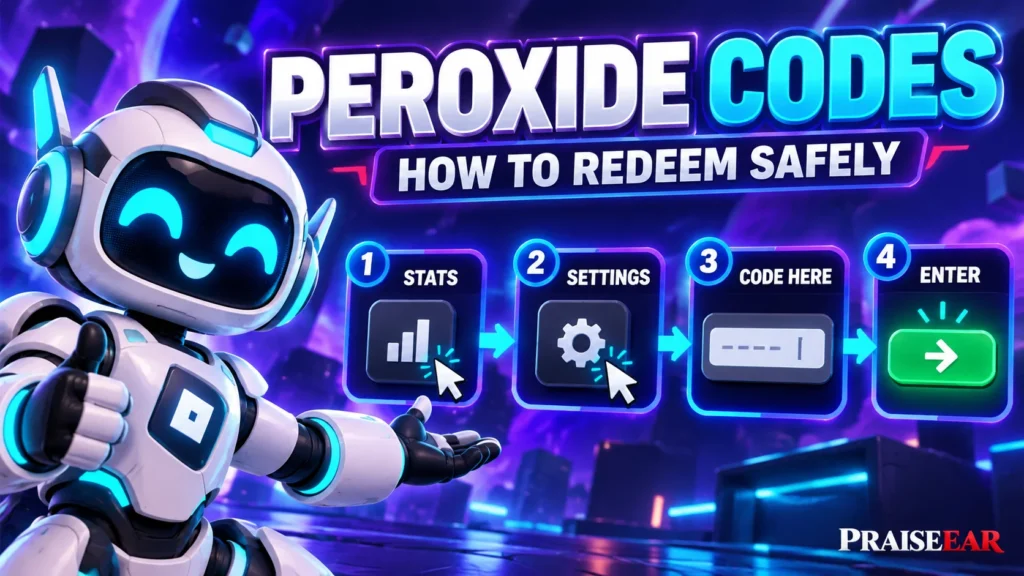
Peroxide codes are entered inside the Peroxide game, not on the general Roblox code redemption page. Open the game menu, find Settings, type a code into the Code Here box, and press Enter. You do not need to give anyone your password or visit a website that promises free rewards.
This guide keeps the steps simple for younger players. If the game is not available on your account, ask a parent or guardian to check its content maturity label and your account settings. Do not try to get around an age or account restriction just to use a code.
What are Peroxide codes?
Peroxide is a fighting game on Roblox. Its creators sometimes release codes that players can enter for rewards within the game. A reward might help with a character choice or provide another game item, depending on the code.
A Peroxide code is not your Roblox password. It is also not a Roblox gift card code or a way to receive free Robux. Those are different things with different redemption methods. If someone says you must pay them, share your account, or complete a survey before they will give you a Peroxide code, stop and ask an adult you trust.
Codes can expire. That is why this guide explains how to redeem them without pretending that a long list of old codes still works today.
Before you enter a code
First, make sure you are playing the actual Peroxide experience through your Roblox account. Let the game finish loading before opening its menus. If this is your first time playing, complete the opening instructions. On a new account, some menu options may not be available until the introduction is finished.
You also need a code to enter. Copy it exactly as shown in a current announcement from the game creators. Letters, numbers, and capital letters may matter. Do not add a space before or after the code.
If you cannot access Peroxide because of your account settings, speak to your parent or guardian. A code does not change which games your account is allowed to play.
How to redeem a Peroxide code
- Open Peroxide in Roblox and wait until your character is in the game.
- Look near the upper left corner for the Stats icon. It may look like a small bar graph. Select it to open the menu.
- Choose the Settings tab inside that menu.
- Find the box labeled Code Here.
- Type or paste your code into the box exactly as it appears.
- Press Enter to submit it. Read the message the game shows to see whether it was accepted.
The menu may look a little different after a game update, but the important part is to find the code box in Peroxide’s own settings. Do not enter a Peroxide game code on a page asking for your Roblox login details.
What if you play on a phone or tablet?
The idea is the same on a touch screen. After the game loads, tap the menu icon near the upper left, open Settings, and tap Code Here. Your device’s keyboard should appear so you can type the code. Use its Enter or Return key to submit it.
Small screens can make buttons harder to see. If you cannot find the box, close any open panels and look again. You can also ask a parent or guardian to help you read the menu. There is no reason to let a stranger sign in to your account to redeem a code for you.
Controls can be less convenient on a console. If the code box will not accept text there, use your own Roblox account on a device with a keyboard or touch screen, with help from a trusted adult if needed.
Why is my Peroxide code not working?
An error does not mean that your account is broken. Check the code carefully before trying again. A common mistake is adding an extra space or confusing similar looking letters and numbers. Pasting a code can help, but check what appeared in the box before pressing Enter.
The code may also have expired, or you may have redeemed it already. An old article can remain online long after its codes stop working. Look for a recent announcement rather than assuming that every code in a search result is active.
If you just started playing, finish the opening instructions and try the menu again. If several codes fail at once, the game may be updating or the menu may have changed. Take a break and check later instead of repeatedly entering random codes.
How can a young player find codes safely?
Start with announcements connected to the game creators. Be cautious when a video, comment, or unrelated website advertises a “secret” code but asks you to follow a link first. A genuine game code should be something you can type into the game. It should not require your password, a payment, or a download.
You do not need to join an outside chat group to follow this guide. If an announcement is on a service you are not allowed to use, ask a parent or guardian to help you check it. Never give your age, phone number, address, or login information to another player in exchange for a code.
Remember the difference between rewards and scams
A code that works in Peroxide gives a reward in Peroxide. It does not unlock unlimited Robux. Roblox warns players that offers of free Robux from generators are scams. Treat anyone promising special rewards in return for account information the same way.
If a page asks you to sign in, check that you are using the real Roblox app or website. If someone in a game asks for your password or a security code, do not send it. Tell a parent or guardian and use Roblox’s reporting tools.
Quick answers
Where do I type a Peroxide code? Open Peroxide, select the Stats icon, choose Settings, and enter it in Code Here.
Do I need to pay? No. Entering a game code should not require a payment.
Can a Peroxide code give me free Robux? No. Peroxide codes are for rewards in the game, not free Robux.
What should I do if I cannot play Peroxide? Ask a parent or guardian to review the game’s content maturity label and your Roblox account settings. Do not bypass those settings.
The safest approach is simple: use a current code, enter it in the game’s own menu, and keep your account details private.
Read more Praiseearcouk.info